


Getting Started with the GPD Pocket 3
The GPD Pocket 3 is not just another portable device—it’s a powerful ultrabook that packs a punch with the Intel Core i7-1195G7 and Intel Gold 7505 despite its small form factor. Designed with versatility in mind, the GPD Pocket 3 is the perfect mini laptop for professionals, gamers, and tech enthusiasts alike. Whether you’re using it for office tasks, multimedia editing, or programming, this ultra-portable device has you covered. This guide will walk you through everything you need to know to get started with your GPD Pocket 3, ensuring that you can unlock its full potential right out of the box.
Inspect the GPD Pocket 3
When you first receive your GPD Pocket 3, it’s important to thoroughly inspect the device to ensure everything is in working order. Here’s a checklist to help you get started:
- Check the device case/shell: Carefully examine the outer case for any cracks, dents, or other damage that may have occurred during shipping.
- Test all keyboard keys: Ensure all keys are responsive and registering properly. You can test your keyboard at https://keyboard-test.space/ or simply open Notepad and try each key.
- Touchscreen functionality: Test every part of the touchscreen to ensure it responds correctly to touch. Make sure you can interact with all corners and areas of the screen without any unresponsive zones.
- Check touchpad functionality: Verify that the touchpad is working correctly. Any erratic or unexpected behavior could indicate a need for a firmware or driver update.
- Test USB ports: Plug in common USB devices such as a mouse, keyboard, or flash drive to ensure all USB ports are functioning properly.
- Check HDMI port: Connect an HDMI cable to the device and a monitor or TV to confirm the HDMI output is working correctly.
- Test the fingerprint sensor: If your GPD Pocket 3 model includes a fingerprint sensor, make sure it’s responsive and can be set up properly.
- Verify audio output: Test the speakers and headphone jack to ensure clear audio output.
- Check the hinge mechanism: Open and close the laptop several times to ensure the hinge operates smoothly and holds the screen at your desired angle.
- Test the webcam: Open the camera app to verify that the built-in webcam is functioning correctly.
By thoroughly inspecting your GPD Pocket 3, you can identify any potential issues early on and ensure your mini laptop is ready for use.
If you have any issues, here, at GPD Store we offer our full support. Just head over to our Contact Us page and reach out.
Update GPD Pocket 3 Windows & Drivers
Updating Windows 11
Keeping your GPD Pocket 3 up-to-date is crucial for optimal performance and security. Here’s how to check for and install Windows 11 updates
- Open the Start menu by clicking the Windows icon or pressing the Windows Key
- Select the Settings icon (gear symbol) or type “Settings” in the search bar and press RETURN(Enter).

- In the Settings window, click on “Windows Update” in the left sidebar.
- To check for available updates, click the “Check for updates” button.

- If updates are available, Windows will begin downloading them automatically.
- Once downloaded, you may need to restart your GPD Pocket 3 to complete the installation process.

Note: Your GPD Pocket 3 is set to automatically check for updates, but it’s a good practice to manually check periodically. You can customize update settings by clicking “Advanced options” in the Windows Update menu
How to Update Drivers on the GPD Pocket 3
Windows Update
Windows Update is the simplest and most reliable method for updating most drivers:
- Open the Start menu and click on Settings (gear icon).
- Select “Windows Update” from the left sidebar.
- Click “Check for updates.”
Windows will automatically download and install available driver updates along with other system updates.
Device Manager
For more specific driver updates:
- Right-click the Start button and select “Device Manager.”
- Expand the category for the device you want to update.
- Right-click on the device and select “Update driver.”
- Choose “Search automatically for drivers.”
Intel Driver & Support Assistant
Since the GPD Pocket 3 uses Intel processors, the Intel Driver & Support Assistant can be particularly useful:
- Download and install the Intel Driver & Support Assistant from Intel’s official website.
- Run the tool to automatically detect and update Intel-specific drivers.
Note: Always download drivers from official sources to ensure system stability and security. While Windows Update covers most essential drivers, using the Intel tool can help keep Intel-specific components optimized for your GPD Pocket 3.By regularly updating your drivers, you’ll ensure your mini laptop maintains peak performance and compatibility with the latest software and hardware
Must-Have Software for the GPD Pocket 3

To maximize the potential of your GPD Pocket 3, consider installing these essential applications:
Windows Optimization
- Intel Driver & Support Assistant: Ensures your device has the latest Intel drivers for optimal performance. It automatically detects and updates drivers specific to your GPD Pocket 3’s hardware.
- Windows 11: Many users recommend upgrading to Windows 11 for better touch screen support and Android app compatibility. The new interface is also more touch-friendly, which suits the Pocket 3’s form factor.
Productivity
- Microsoft Office or LibreOffice: For document editing and creation. Microsoft Office offers seamless cloud integration, while LibreOffice is a free, open-source alternative with comparable features.
- OneNote: Ideal for note-taking, especially with the device’s stylus support. It syncs across devices and offers features like handwriting recognition and audio recording.
Entertainment
- VLC Media Player: A versatile media player for various video and audio formats. It’s lightweight, supports a wide range of codecs, and can handle network streams.
- Steam: For gaming on the go. While the GPD Pocket 3 isn’t primarily a gaming device, it can handle light to moderate gaming, especially with less demanding indie titles.
Utilities
- 7-Zip: For file compression and extraction. It supports multiple archive formats and offers better compression ratios than built-in Windows tools.
- ShareX: A powerful screenshot and screen recording tool with extensive editing and sharing capabilities.
Development
- Visual Studio Code: A lightweight, versatile code editor with extensive plugin support, making it suitable for various programming languages and tasks.
- Git: Essential for version control if you’re a developer. It integrates well with many development environments and cloud services.
Remote Access
- TeamViewer or AnyDesk: For remote desktop access and support. These tools allow you to control your home or work computer from your GPD Pocket 3 when you’re on the go.
Security
- Malwarebytes: Additional protection against malware and viruses. It complements Windows Defender and can perform deep scans to remove stubborn malware.
Customization
- AutoHotkey: For creating custom keyboard shortcuts and macros, which can be particularly useful on the compact keyboard of the GPD Pocket 3. It allows you to automate repetitive tasks and enhance productivity.
Linux Option
For those interested in running Linux, Ubuntu 23.10 has been reported to work well on the GPD Pocket 3, with good hardware support including screen auto-rotation, pen input, and S3 sleep. It offers a lightweight alternative to Windows for development and general use.By installing these applications, you’ll be well-equipped to take full advantage of your GPD Pocket 3’s capabilities, whether for work, entertainment, or development purposes
Must Have Accessories
GPD G1 eGPU – Unleash your Pocket 3’s Full Potential
The GPD G1 eGPU is a game-changing accessory for your GPD Pocket 3
- Powerful Performance: Houses an AMD Radeon RX 7600M XT, dramatically boosting graphics capabilities.
- Versatile Docking Station: Offers additional ports and connectivity options.
- Compact and Portable: Easy to carry alongside your Pocket 3.
- Seamless Integration: Designed specifically for GPD devices
- USB 4 and Occulink connection: Whilst the GPD Pocket 3 does not have an Oculink port, the latest SKUs of the Pocket 3 come with USB 4.0, allowing you to take advantage of the GPD G1 eGPU
The GPD G1 eGPU transforms your Pocket 3 into a more capable machine for gaming, content creation, and demanding applications. It’s an ideal accessory for users seeking to maximize their mini laptop’s potential.
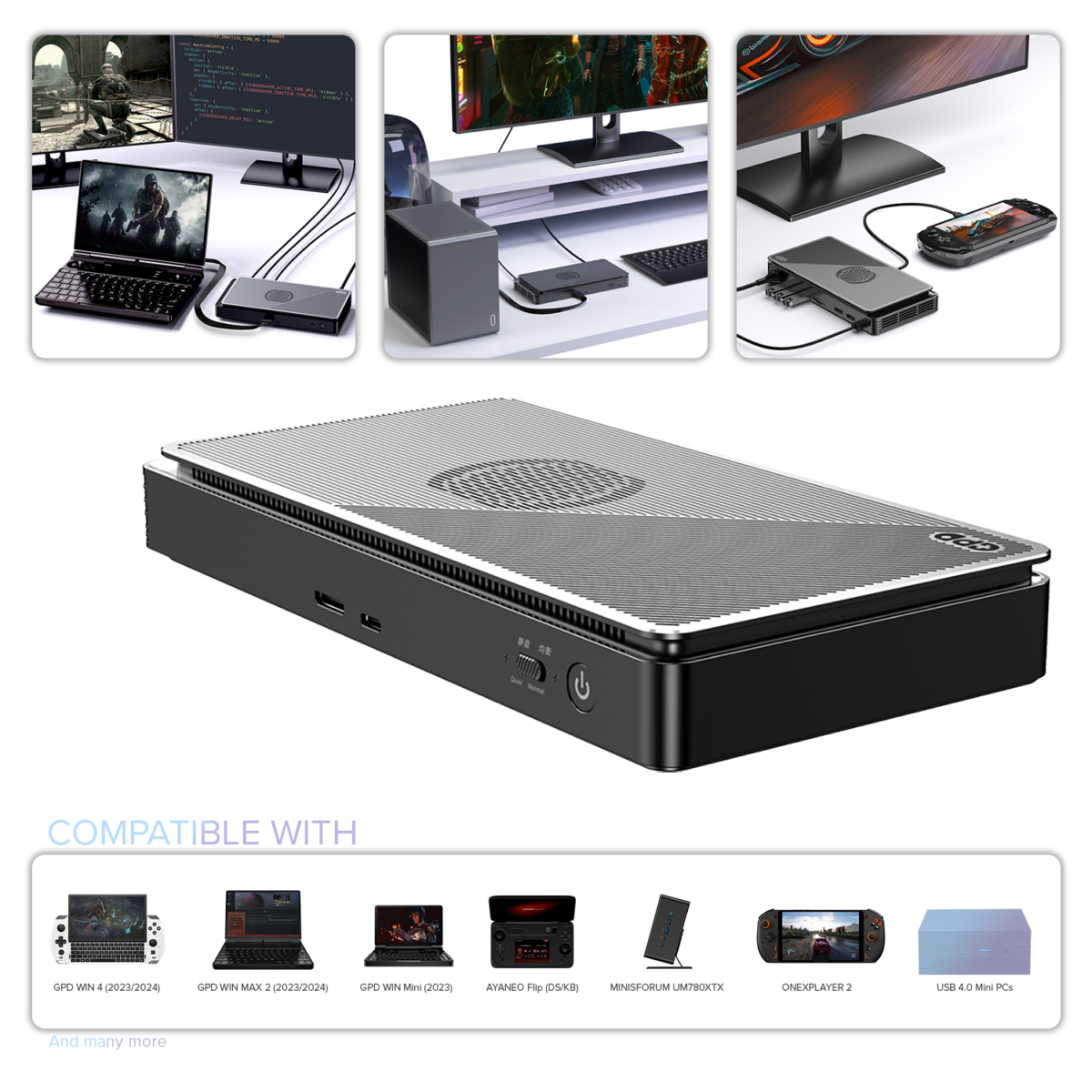
GPD G1 (2024) eGPU Docking Station
$964.32
DroiX PM14 Portable Monitor
The DroiX PM14 is an ideal companion for your GPD Pocket 3:
- High-Quality Display: 14-inch 4K UHD screen with 100% DCI-P3 color gamut and HDR400 support.
- Versatile Connectivity: USB-C and Mini HDMI ports for easy connection to various devices.
- Portable Design: Ultra-thin (578g) with a built-in kickstand for easy setup.
- Compatibility: Works seamlessly with laptops, smartphones, and gaming consoles.
This portable monitor enhances your Pocket 3’s capabilities, providing extra screen real estate for productivity or entertainment. Its high-resolution display and compact design make it perfect for users who need a larger screen on the go.
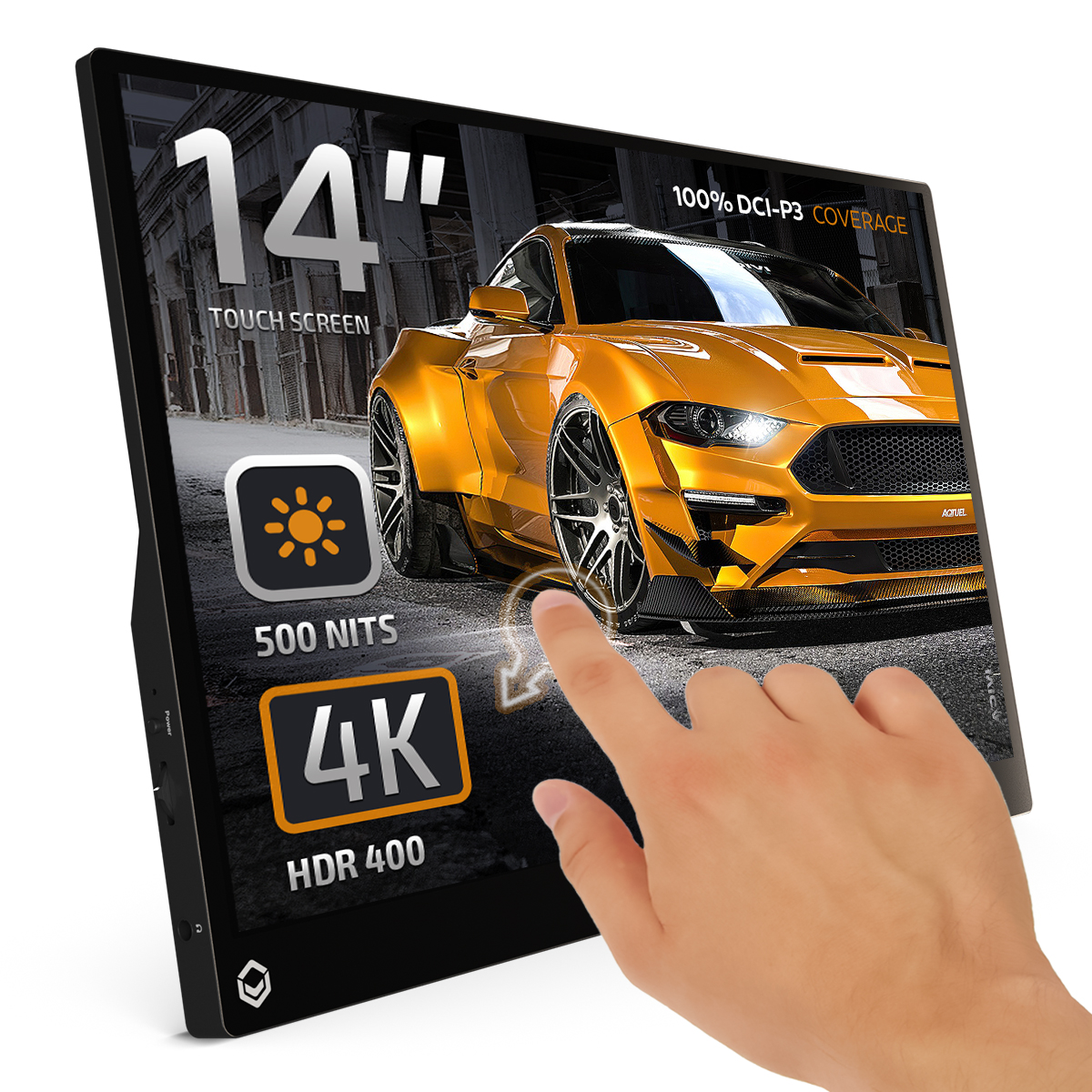
DROIX PM14 4K Portable Monitor
Buy GPD Pocket 3 from GPD Store
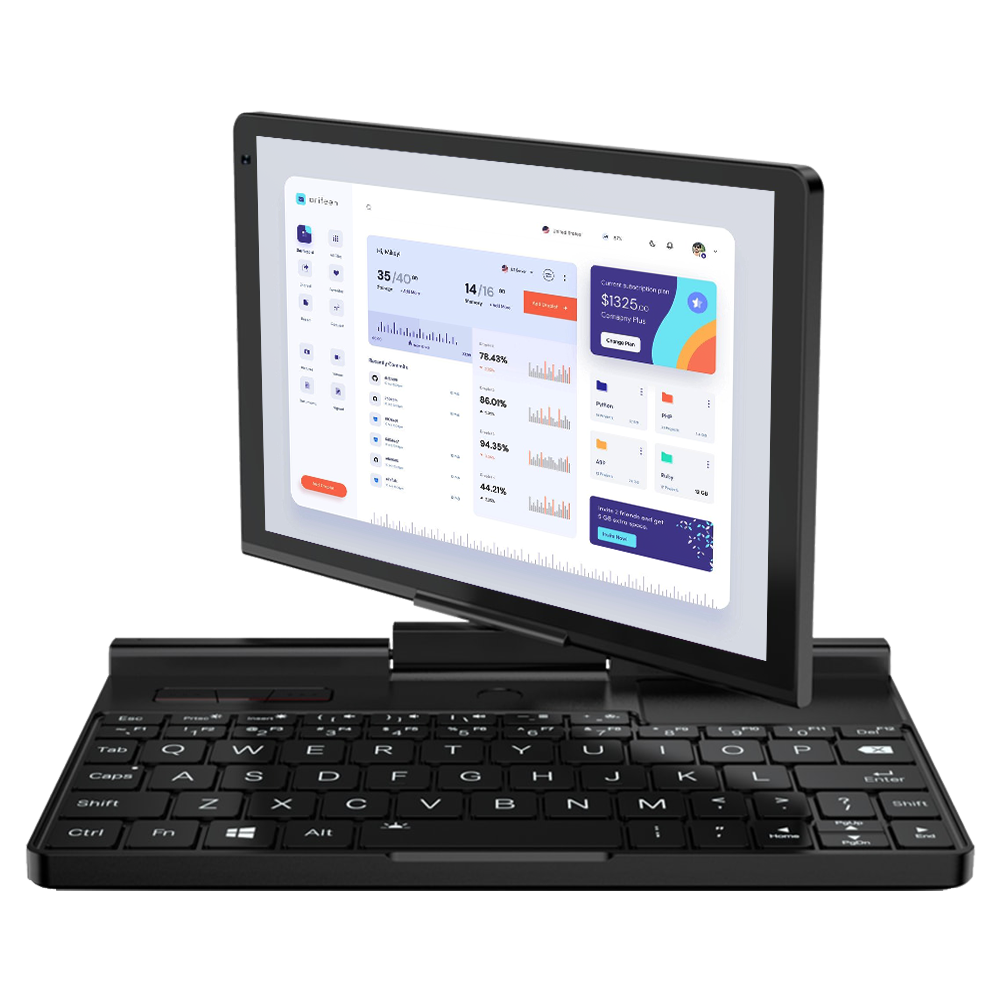
GPD Pocket 3 Mini Laptop
- Intel® Pentium® Gold 7505 up to 3.50GHz ; 4 Cores/8 Threads
- 16GB LPDDR4x RAM @3733Mhz
- Thunderbolt 4 / 8″ Touchscreen Display / Fingerprint Scanner
- Up To 4TB of PCI-E NVMe SSD
- Modular w/ KVM/RS-232 Ports (Sold Separately)

Flexible & secure payment options
2-year warranty on all GPD products
QUALITY ASSURANCE & PRE-DISPATCH TESTING
Pricing, taxes & shipping
- United States Customers: The displayed price does NOT include TAX nor duties. Liability to clear customs and pay any associated tax/duties lies on the customer.
- EU Customers: The displayed price includes applicable TAX, which may be up to 25% depending on your country.
- Canada Customers: The displayed price includes applicable taxes, which may include 5% GST and additional Provincial Sales Taxes (PST), Harmonized Sales Tax (HST), or Quebec Sales Tax (QST), depending on your province.
For EU Customers ONLY: Express DDP (Delivered Duty Paid). This means:
-
- All customs duties and taxes are included in the price displayed on the product page.
- You will not need to pay any additional charges upon delivery.
- In the rare event of customs-related issues, our team will handle the customs clearance process on your behalf to ensure a smooth delivery experience.
- If you decide to return your order or request a refund, please be aware that taxes and duties paid on your behalf under DDP terms cannot be refunded.
Important Information About Returns:
Please refer to our
- for detailed information.
Customer support
What's included
- 1x GPD Pocket 3
- 1x Power Adapter
- 1x USB Type-C Cable
- 1x User Manual
- 1x GPD Stylus
Frequently Asked Questions
GPD Pocket 3
Sorry, no FAQ matched your criteria.
Questions on this guide
4 answeredIn windows 11 with pocket 3.. there is no tablet mode when I turn the screen.. help.. love the pocket 3.. but need it to go into tablet mode when I rotate the screen so I can type omscreen

Try going to Start > Settings. In Settings, select Personalization > Taskbar. Turn the toggle on/off to enable/disable the on-screen keyboard. Click the keyboard icon on your taskbar to bring up the on-screen keyboard
Dear All
Good Evening,
I’m now facing to connect/installing my active style pen with my GPD Pocket 3. Earlier it was work, after Installed newly Windows (last few days ago Windows Installed) I’m facing this issue.
Could you please tell me the reason or how to overcome the issue.
Thanks & Regards,
Md. Shafikul Islam Mento
Dhaka, Bangladesh
Note: I purched my GPD Pocket 3 Laptop last monhth end only………
Did you install the GPD version of Windows? If not then you the GPD Drivers have probably not been installed. You can reinstall Windows with the GPD drivers using the Windows install at https://drive.google.com/file/d/1uFH6NpiIlDHdrjZrX6CmgNKv1KOE4oeO/view?usp=sharing
I have a Windows 11 GPD 3 Pentium Gold, and I’m trying to use anAdonit Notee.Thee mouse works, but the stylus does not wor.k I read oRedditit that a batch firmware fixed it for someone, but I don’t know what batch file or where to find it.
As far as I know there are no BIOS or firmware updates for this that would include support for different stylus. Maybe you read a driver update? You can download the GPD Pocket 3 7505 drivers from https://drive.google.com/file/d/1Kr86AIS90oBTw5ui5qJQ8FqyvTFi-D0F/view?usp=sharing and try updating them.
Hello, I have a question.
My Pocket 3 isn’t producing any sound.
Are there any drivers or an instructional video available?
Thank you very much.
There could be a number of reasons why the audio is not working. First check in the Audio settings on Windows and check the correct audio output (Speakers) is enabled and that it has sufficient volume. There is a button you can press to test the audio and see if it is playing. There are a few different CPU models of Pocket 3 and you can try reinstalling the drivers. Check which CPU you have in Task Manager and download the respective drivers from below.
GPD Pocket 3 (1195G7 / 7505 / 1125G4) Drivers V1.7 https://drive.google.com/file/d/1Kr86AIS90oBTw5ui5qJQ8FqyvTFi-D0F/view?usp=sharing
GPD Pocket 3 (N6000) Drivers V1.3 https://drive.google.com/file/d/1r7AUsWOYB8UxGkJ8AxtKkGS058er5CgV/view?usp=sharing
If you are still having an issue, and you purchased the GPD Pocket 3 from us at GPDSTORE, please email [email protected] with your order number and some information. Our customer service will look into the issue further.


